ViewPLUS SCADA Web API
Introduction
You can access and control the devices on the field by using ViewPLUS SCADA Node WebAPI.
Download ViewPLUS SCADA Node WebAPI from the following link:
Database Connection
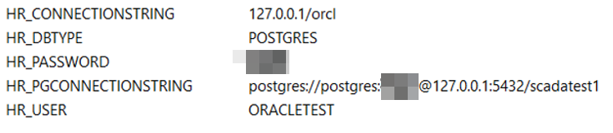
The database type that the project is working on must be specified with the HR_DBTYPE environmental variable (POSTGRES / ORACLE) For a project on the Postgresql database, the HR_PGCONNECTIONSTRING environmental variable must be set in the format given in the example below. For a project on Oracle database, HR_CONNECTIONSTRING, HR_USER and HR_PASSWORD environmental variables should be set in the following format.
Starting the Server
- Install node.js
- Install dependencies: In the application folder type "npm install"
- Set enviromental variables for: HR_DBTYPE : POSTGRES or ORACLE HR_CONNECTIONSTRING : Oracle DB connection string(example : 127.0.0.1/orcl) HR_PGCONNECTIONSTRING : Example postgres://postgres:[email protected]:5432/scadatest1 (example; user: postgres, pwd: qwx123, server: 127.0.0.1, port: 5432, project: scadatest1) HR_USER : Oracle DB user name for project( It is SCADA project name) HR_PASSWORD : Oracle DB password
- Configure web server port if needed on the file ".\config\web-server.js" (default 3000)
- Change application secret for JWT on ./config.js
- Start server by typing "node ."
For taking an Access token
A new user is created in the SCADA. The user must have the "Can Access Reports" authority. Inside the body, a POST query is sent to http://localhost:3000/api/auth/login with the keys "username" and "password". A token is taken as follows:
{
    "auth": true,
    "token": "eyJhbGciOiJIUzI1NiIsInR5cCI6IkpXVCJ9.eyJpZCI6MSwiaWF0IjoxNTM3MzU5MDc1LCJ leHAiOjE1Mzc0NDU0NzV9.NX5kX4HLVdE4IoPcSBWkdlGKK_pksHnTnEoWCx1xCyc"
}
http://localhost:3000 is given as an example. Replace this with the actual system's IP and Port information.
To read data from API
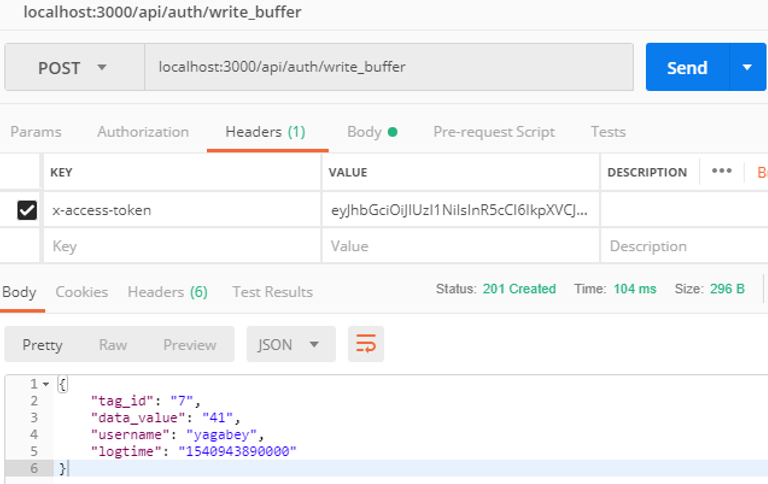
The following GET requests can be sent by adding this token to the "x-access-token" key value in the header:
- Information of all tags defined in the system
http://localhost:3000/api/auth/tags   or http://localhost:3000/api/auth/tags/{id}
Sample Result:
[
  {
    "id": 1,
    "tagname": "tag1",
    "kanal_id": 1,
    "polfreq": 3,
    "deviceaddress": "1",
    "variableaddress": "0",
    "variablesize": 4,
    "variabletype": 2,
    "islogging": 0,
    "privilegelevel": 0,
    "tagtype": 0,
    "schedulerindex": 0,
    "loggingfreq": 300,
    "loggingmethod": 6619250,
    "readright1": 0,
    "readright2": 0,
    "writeright1": 0,
    "writeright2": 0,
    "keywords": null,
    "enabled": 1,
    "description": null,
    "unitname": null,
    "protocolobjecttype": 0,
    "toption": 0,
    "logfilteroptions": "{\n \"filtertype\": 0,\n \"refval1\": null,\n \"refval2\": null\n}\n",
    "equipment": null,
    "measuredentity": null,
    "location": null,
    "formula": null,
    "modified": 0
  },
  …
]
- Information of all alarms that defined in the system
http://localhost:3000/api/auth/alarms  or http://localhost:3000/api/auth/alarms/{id}

Sample Result:
[
  {
    "id": 1,
    "alarm_name": "Alarm1",
    "alarm_desc": "NoDescription",
    "alarm_class": "General",
    "enabled": 1,
    "ackrequired": 0,
    "islogging": 0,
    "tag_id": 3,
    "alarm_type": 0,
    "alarm_level": 0,
    "comp_type": 1
  },
  …
]

By using the "tag_id" value in this scheme, information about the tag that causes the alarm can be accessed from "api / auth / tags".
- List of alarms that are instantly active in the system:
http://localhost:3000/api/auth/active_alarms or http://localhost:3000/api/auth/active_alarms/{id}

Sample Result:
[
  {
    "id": 4,
    "alarm_id": 1,
    "user_name": null,
    "dataval": 1,
    "currentstate": 1,
    "trigertime": 1537229311140,
    "acktime": -1,
    "recovtime": -1,
    "logtime": 1537229311140,
    "logdate": null,
    "mailsent": 0,
    "ackmessage": null
  },
  …
]

The details of the alarm can be accessed from "api / auth / alarms" by using the "alarm_id" value in this scheme.
- Information of all channels defined in the system
http://localhost:3000/api/auth/channels  or http://localhost:3000/api/auth/channels/{id}

Sample Result:
[
  {
    "id": 1,
    "channelname": "Channel1",
    "mediatype_id": 0,
    "sockettype_id": 0,
    "paritytype_id": 0,
    "protocoltype_id": 0,
    "serverport": 1080,
    "listenport": 1081,
    "serverip": "127.0.0.1",
    "filterip": "0.0.0.0",
    "comport": 11,
    "baudrate": 115200,
    "databit": 8,
    "stopbit": 1,
    "responseto": 6000,
    "connectionto": 6000,
    "frameto": 3000,
    "groupid": -1,
    "station": null,
    "enabled": 1,
    "logicpropath": null,
    "description": null,
    "modified": 0,
    "state": null
  },
…
]
- Instantaneous values of labels defined in the system
http://localhost:3000/api/auth/rt_values or http://localhost:3000/api/auth/rt_values/{id}

Sample Result:
[
  {
    "id": 1,
    "tag_id": 3,
    "dataval": 1,
    "logtime": 1537229310000,
    "logdate": "2018-09-18T00:08:30.000Z"
  },
…
]
- Updating the tag value in the system
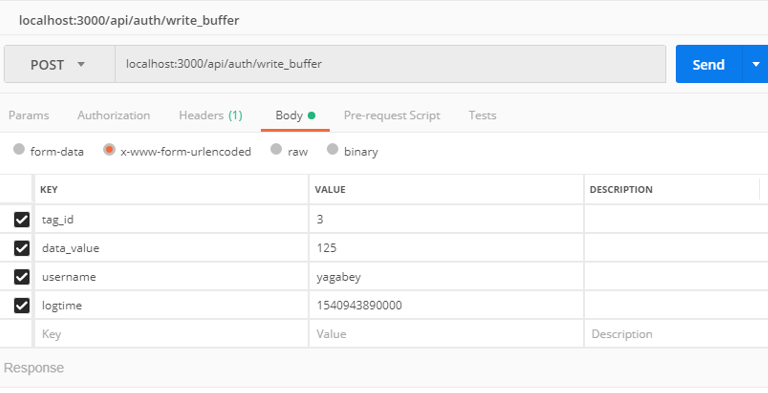
localhost:3000/api/auth/write_buffer